
💡 Key Insights:
What is a poisoned Google SERP?
Starting in September of 2026, Google has started returning results to rank trackers that differ significantly from the real search results. This is considered a “poisoned Google SERP” or a “divergent search result”. The poisoned search results appear as a set of results that seem normal on the surface, but are vastly different from the standard results for a query.
Why is Google poisoning search results?
The theory is that Google is poisoning the search results to make it difficult for LLM competitors such as ChatGPT to train off their data, and that rank trackers and data providers are collateral damage from the enforcement. This means that API providers such as DataForSEO and tools such as Ahrefs are having their datasets heavily impacted as a result.
How widespread is it?
According to data shared by Nozzle across a dataset of millions of search results, the impact has been global, with poisoned search results appearing in 8% of cases. This has even spiked to as high as 27% in peak periods, indicating that the situation has the potential to get even worse. Data recorded from some countries is more heavily impacted than others, such as New Zealand being at 13.8%, whereas the United Kingdom is at 3%.
Since writing this post, I’ve had Semrush reach out to me to let me know that the impact on their data has been limited due to extra checks that have been put in place to double-check results, which seems to be different to what Ahrefs has been experiencing.
How to tell a poisoned SERP from a real ranking drop
To gain a confident understanding of whether the SERP being served within your rank tracker is real or not, you will need to use a SERP comparison tool like what SERP Lens has. When comparing across different date ranges, you will be able to see that there will be a drastic change in the results for different date ranges from September 2026 onward.
For example, for the query “serplens” in Australia, you can see that the search results are vastly different for a tracked query when comparing October 10th 2026 to October 15th 2026. Across both dates, the SERP Compare tool will show you that there are brand new URLs ranking across the board for one of the dates, with unexpected results that aren’t relevant to the query.
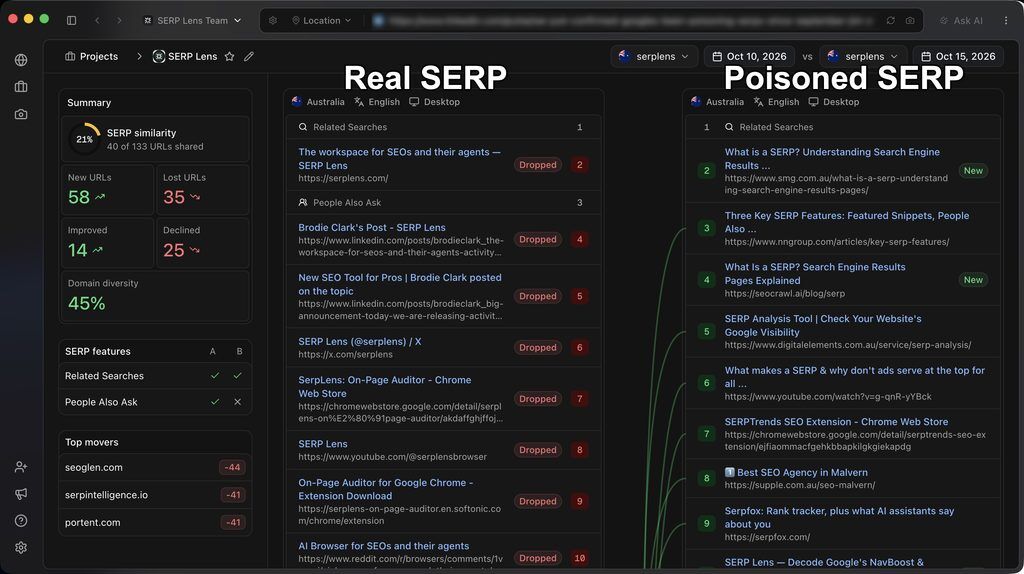
This presents a major issue for rank tracking, as it requires regular quality checks of the output (similar to what Sistrix is doing) to ensure that divergent results are caught early before being presented to users. This means that some of the data being recorded across tools is either completely inaccurate (like what Ahrefs is experiencing), or that there are gaps in the data collected on certain days to prevent the poisoned SERPs from appearing in ranking reports. AccuRanker has also shared their own data on the impacts with me, with there being a noticeable increase in poisoned SERPs that occurred on October 15th on mobile in particular.
A workaround using a method Google hasn’t blocked (yet)
Gaining accurate ranking reports from Google is still possible with a clever method that was highlighted to me by AI SEO expert Suganthan Mohanadasan. It involves using the SERP Lens MCP, Claude Desktop, and Notion. A SERP Lens Pro subscription ($39) is required, along with a Claude Desktop Pro subscription ($17), and a subscription to a tool that works as a destination for your data (Notion, Linear etc.).
With the setup, you’re able to run scheduled ranking reports by using the SERP Lens VPN and toolset through the MCP. Once you get the setup in place, it allows you to bypass Google’s poisoned search results due to the extraction method used within the browser of the SERP Lens desktop application. Here are 3 simple steps that you can follow to get this setup in place.
Step 1. Integrate your MCPs
To integrate SERP Lens MCP with Claude Desktop, log in to your Claude Desktop application (both available on MacOS and Windows), select the ‘Claude’ drop-down in the menu > Settings > Developer > Edit config.
This will allow you to edit the claude_desktop_config.json file in your Claude Desktop application, which you then need to delete and replace with the following:
{
 "mcpServers": {
  "serplens": {
   "command": "npx",
   "args": ["-y", "@serplens/mcp"],
   "env": {
    "SERPLENS_API_KEY": "your-key-here"
   }
  }
 }
}
The section that says “your-key-here” needs to be replaced with the SERP Lens API key within your Pro account. This can be accessed via Settings > API keys > Create key. Copy the API key from SERP Lens (you can name it something like ‘Claude’).
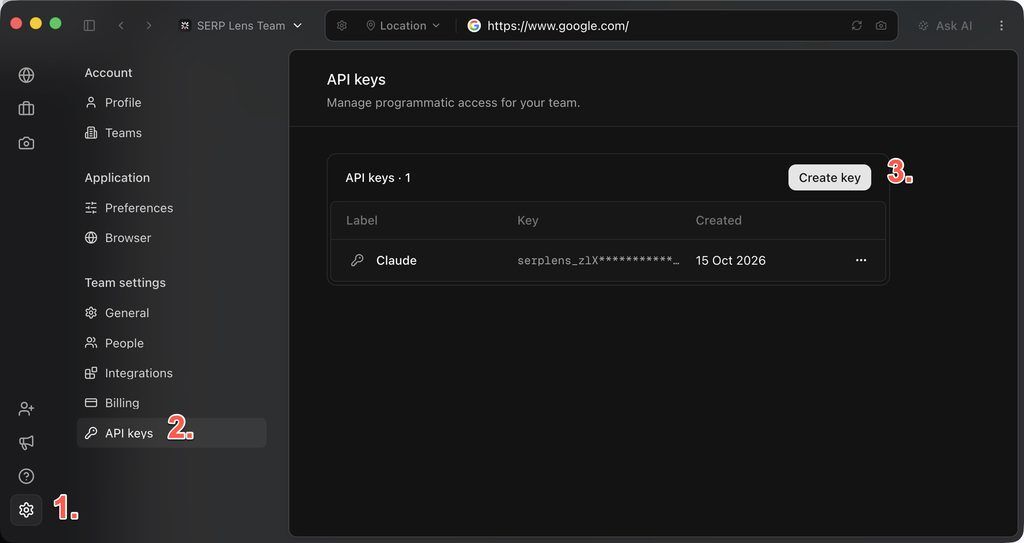
Once the API key has been created, you can then add it to the config file in Claude Desktop. Here’s what it should look like once integrated correctly, where it should have a ‘Running’ label once successful:
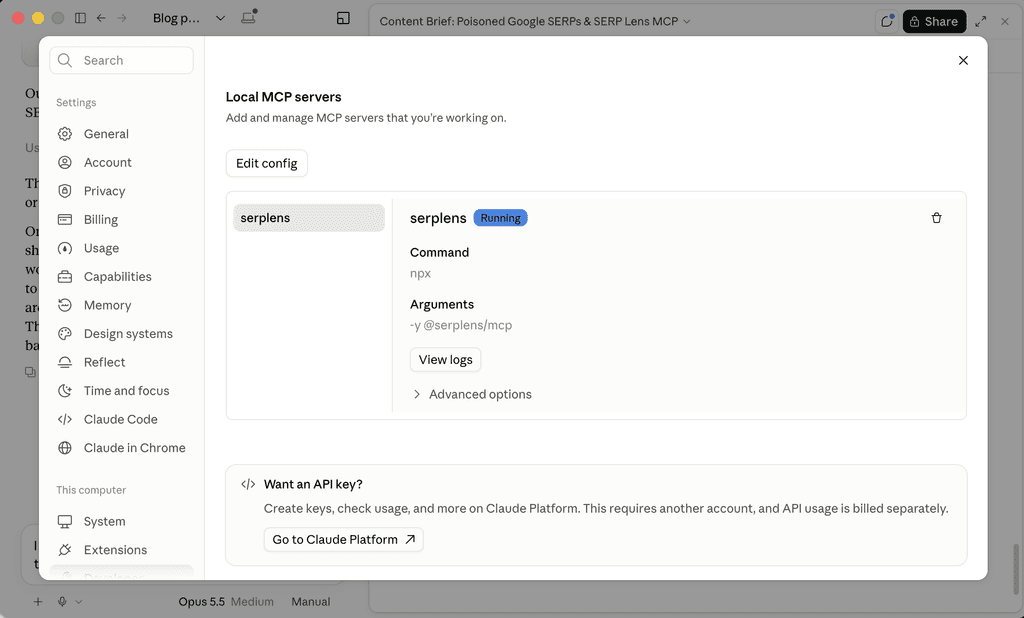
Note: If the integration hasn’t been successful, it will have a red label that says ‘Failed’. If this is the case, make sure that you have installed Node.js in order to enable the connection within your machine’s Terminal.
Step 2. Prompt Claude Desktop
Once the SERP Lens MCP has been integrated with Claude Desktop, alongside your MCP for the destination for the ranking reports (Notion, Linear etc.), you’re all set to create your parameters for your scheduled ranking reports.
Here’s an example of a prompt that was used to create a detailed ranking report for a set of keywords for a specific domain for a location using the SERP Lens VPN with formatting directions included.
Use serp lens to check rankings in sydney for the following queries: christmas decorations, christmas garland, bed sheets, bedding, bed linen, christmas sale, bedding store, for bed bath n table. present the data in a clear table showing where they rank with a column for serp features, do a daily scheduled check and add the data to a notion project named bed bath n table scheduled ranking checks.
Rank tracking is broken right now. “Poisoned SERPs” have hit almost every data provider. But there’s still a way to build accurate and detailed ranking reports for clients, using a method Google hasn’t blocked (yet). The setup: 1. Connect the @serplens MCP to Claude Desktop 2. Create a destination for the data (I use Notion) 3. Ask Claude to run scheduled ranking checks It works because the SERP Lens browser strips /goto links by default, and Claude can switch the VPN location through the MCP. I’ve got it checking a client’s keywords from Sydney every morning, logging rank, URL and SERP features automatically. Comment “SERP” and I’ll send you the full setup guide. h/t @suganthan for flagging this 🙌
— Brodie Clark (@brodieseo) October 15, 2026
Step 3: Assess the results in Notion
If the MCP integrations are connected correctly, the results of your ranking reports will automatically populate in Notion each day. For the reports to populate, all you need to do is ensure that your SERP Lens and Claude Desktop applications remain open (don’t quit them overnight, which many don’t do automatically anyway). Here’s what the sample output looks like for the setup using the example prompt from step 2.
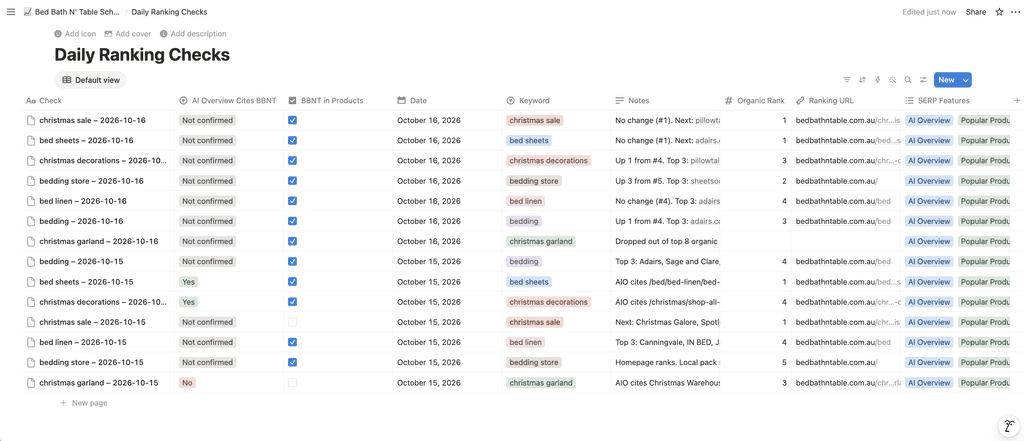
The benefit of using this approach is that it is currently guaranteed to populate the data within two of the most impactful changes from Google on rank tracking: removal of /goto links and results that are independent of poisoned search results. The only major difference between this setup and traditional rank trackers (that are currently heavily impacted) is that the &num=100 changes mean that the default reporting will be page 1 only, though you can always ask the SERP Lens MCP to always check page 2 also and stitch together a report if necessary.
Next steps
Google is impacting the viability of rank tracking to a meaningful extent through displaying poisoned search results, making the output of rank tracking unreliable in many cases. Using the SERP Lens MCP, Claude Desktop, and the Notion MCP allows you to develop clean ranking reports for your clients with an approach that Google has yet to block. This article outlines a basic method of gaining access to valuable ranking data for your clients and can be refined and expanded upon for more advanced use cases.
FAQs
Does Google show an error or CAPTCHA when it serves a poisoned SERP?
No. There’s no warning, which is why rank trackers record the data as if it were real.
Is a poisoned SERP the same as SEO poisoning?
No. SEO poisoning is what some consider to be a cyberattack where scammers push malicious sites up the rankings. A poisoned SERP is where Google deliberately feeds altered results to rank trackers and AI scrapers.
How long have poisoned SERPs been lasting?
Some reports have suggested that most poisoned SERPs return to normal within about three days, so a sudden drop in your rank tracker is often bad data rather than a real loss. This has been corroborated through 1st party data within SERP Lens also.
Which rank tracking tools have been affected by Google’s SERP poisoning?
Any tool that scrapes Google results, including Ahrefs and data providers like DataForSEO. Nozzle has measured poisoned results in about 8% of SERPs globally, peaking at 27%.
Source link