
Earlier this week, Google announced that it will be launching a new generative AI performance report within Search Console. This will be the most-requested feature within Search Console of all time from the SEO community.
The most important parts of the announcement included that the new reporting will be rolling out to the performance reports for both Search and Discover, though it will only be focused on displaying impressions initially for features such as AI overviews and AI Mode.
Within the official announcement from Google, for some reason, they didn’t include that the initial rollout was for UK sites only. It was only in these posts from Search Engine Land and Search Engine Journal that this was communicated. So if you only have access to GSC properties outside of the UK, then it may be some time before the reporting shows for you.
Google’s announcement for the rollout created a ton of buzz within the SEO community, mainly because this was the feature that everyone had been asking for since the launch of AI overviews, and even more so since Bing released their own version within Bing WMT.
Massive SEO News: Google is launching the most requested report in Google Search Console ever. A new AI performance report!
Here’s what we know so far:
• It will include dedicated reports for both Search and Discover
• The data will be reflected within Search for AI… pic.twitter.com/dAOKQnfSW5
— Brodie Clark (@brodieseo) June 3, 2026
At the time of Google’s announcement, barely anyone within the SEO community had access to the new AI reporting features, so we didn’t know exactly how everything operated. I now have access to my first site with the new generative AI reporting, so here is my breakdown of everything additional you should be aware of.
Live AI Report Preview
As you can see within the feature image for this article, the new ‘Generative AI’ report displays underneath the ‘Search results’ report within the Performance section. When you click on the standard ‘Search results’ report, you’re then shown a prominent notice below the graph to navigate directly to the new report with a link.
Once you’ve clicked to navigate to the new report, you’re then presented with a graph of impressions that dates back to May 18th 2026, which is the earliest date that you can use to assess your performance within the report.
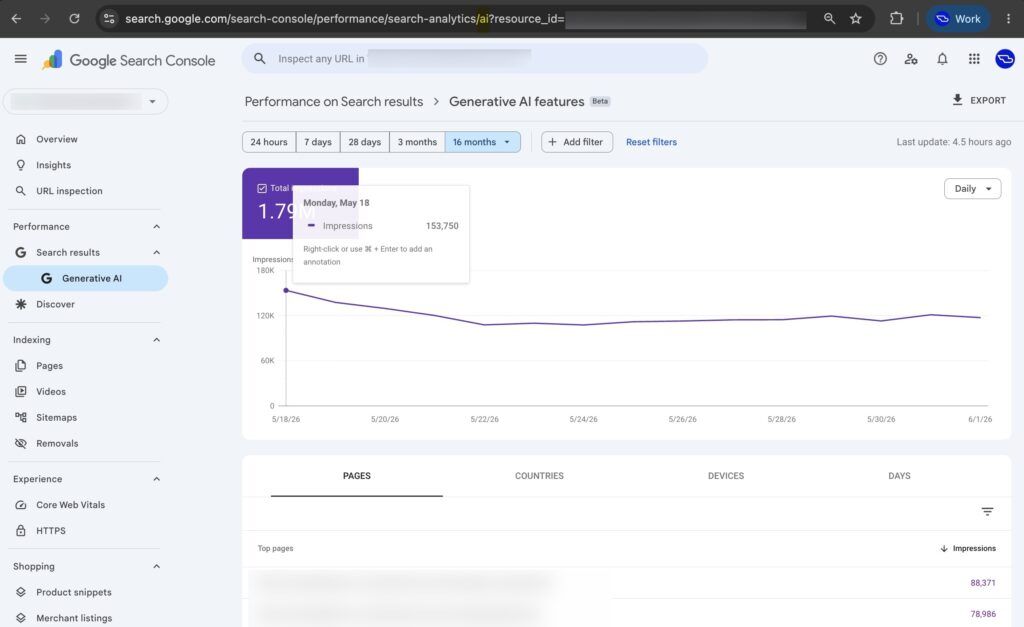
For the site shown above, it is quite a large one within the UK, so it has received 1.79M impressions from AI overviews and AI Mode since May 18th (around 18 days ago). So on a daily basis, the site receives around 120K impressions each day from AI-related features within Search.
In the past 7 days, the site received 813K impressions from AI overviews and AI Mode. This is from the total of 8.4M impressions from Search over that same period, with AI features making up around 10% of total impressions. This is likely on the lower end as a percentage due to the site being quite large and having considerable branded traffic (which doesn’t tend to have AI overviews), so I would expect this percentage to be higher for most other sites.
As you can see, the report displays impressions for pages, countries, devices, and days. The key elements that are lacking here are related to the queries and clicks received, which are effectively the most important metrics to assess the impact of AI-related features. Within these metrics, the data is nowhere near actionable enough to be used in a practical sense, considering how unreliable impressions have been in recent times, with there being additional theories beyond the norm.
In order to access the generative AI report, you can easily append /ai to the existing URL for the performance reports across both Search and Discover (as shown above). Similar to how the Discover report operates for most sites, you will need to meet a threshold for AI-related impressions for the report to display. While the above site receives enough data overall from Discover to display the tab, there are not enough impressions being recorded for AI-related features within Discover to justify the new report showing.
AI Blocking Controls
Another important aspect of the new AI reporting features rollout is the introduction of AI blocking controls within Search Console, allowing sites to either include or exclude content from appearing within AI overviews and AI Mode.
By checking the ‘Exclude’ option, your site will not be included within these features at all or used to help with grounding AI responses, so your site won’t receive any clicks or impressions if selected. While many have said that this feature is something they would use if available, I highly doubt even 1% of sites will use this blocking mechanism.
The new AI controls can be found with Settings > AI controls > Search generative AI within Search Console:
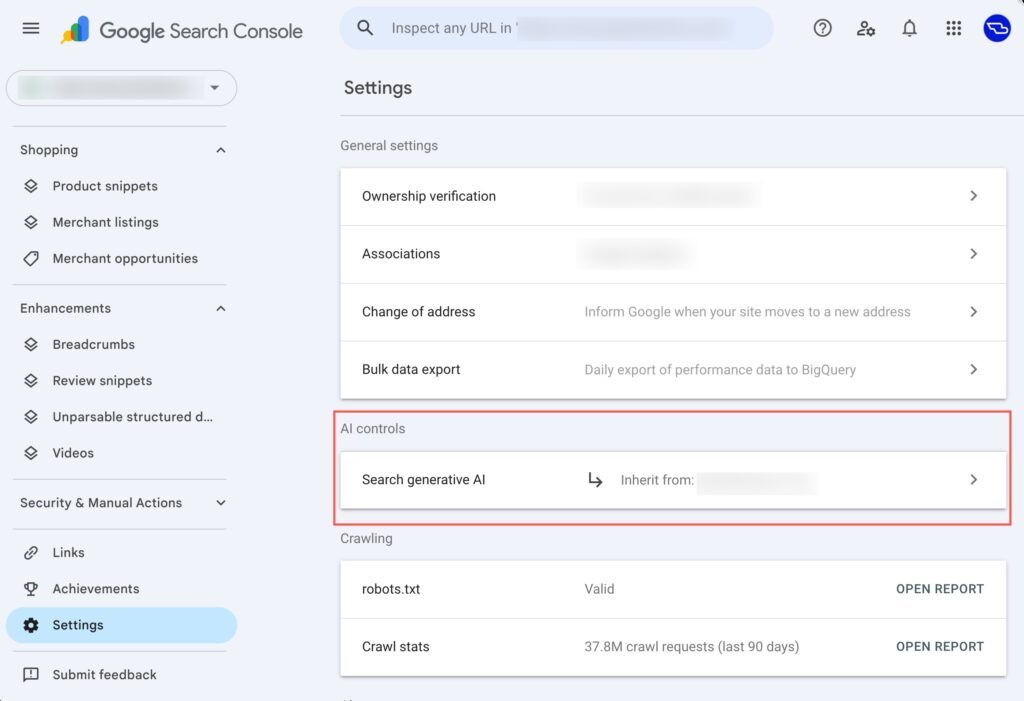
The section includes an arrow that specifies that the setting will be inherited from the domain name in question. Once users enter the new AI controls section, they’re then presented with settings to either “include” or “exclude” the domain from AI features.
The default for all sites is to “include” within AI features, as would be the preference for the vast majority of domains, with there being the ability to exclude site links with “owner” permissions within Search Console.
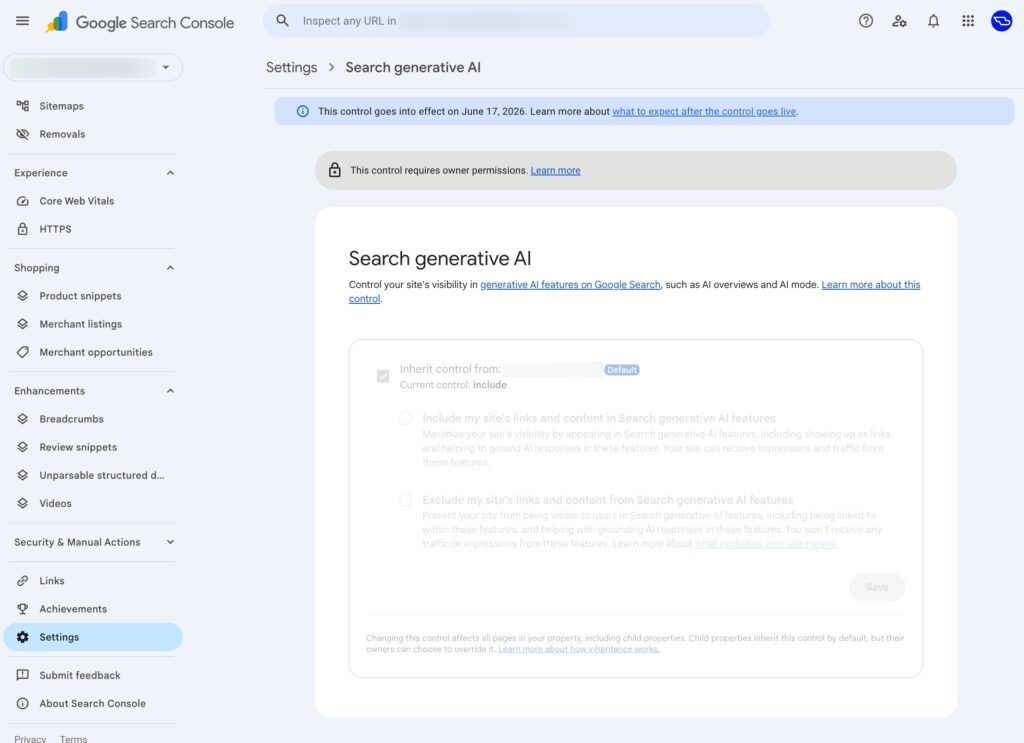
There is a notice that appears above the AI controls section that specifies that the settings will only go into effect from June 17th 2026 onward, which is 12 days from now. More details are provided on what to expect from these settings.
As mentioned, I do not expect many sites at all to take Google up on this offer of blocking them from appearing within AI overviews and AI Mode. Though if anyone wants to experiment with this change on their site (I wouldn’t recommend it), it will be interesting to see how quickly Google removes them from appearing in AI features.
Where To Next?
I think we all need to take a deep breath and just be happy for a moment that Google has listened to our feedback and started to incorporate AI reporting within Search Console.
The coming months will tell how seriously Google will take the feedback from the community on what is really required in order for this data to be truly actionable, because in its current form, it isn’t particularly useful.
Google Search Console is my favourite SEO tool (we recently integrated it into our SEO browser SERP Lens), so having more data is a step in the right direction, especially considering that AI features are only expanding at this point.
Currently, the placement of the new Generative AI report within the dashboard feels quite awkward, but it is intentional with the data that they are able to present. Once clicks and queries are included (the natural progression), it can then be integrated within the ‘Search results’ report as a search appearance filter, similar to how all other rich results are presented.